 Tag Master · GTM & GA4 debugger
Every tag on the page. Any container, by ID.
A tag debugger in Chrome’s side panel: every hit from 63 platforms decoded, the dataLayer and what it actually sent, and any published GTM container laid out like GTM.
- 63 platforms, no configuration
- Nothing leaves your browser
- Works on sites you do not own
63 platforms decoded in real time
The panel
One side panel instead of five tools
Everything you would otherwise check across GTM Preview, DebugView, the console and a vendor helper per platform — in the tabs you will find in the extension.
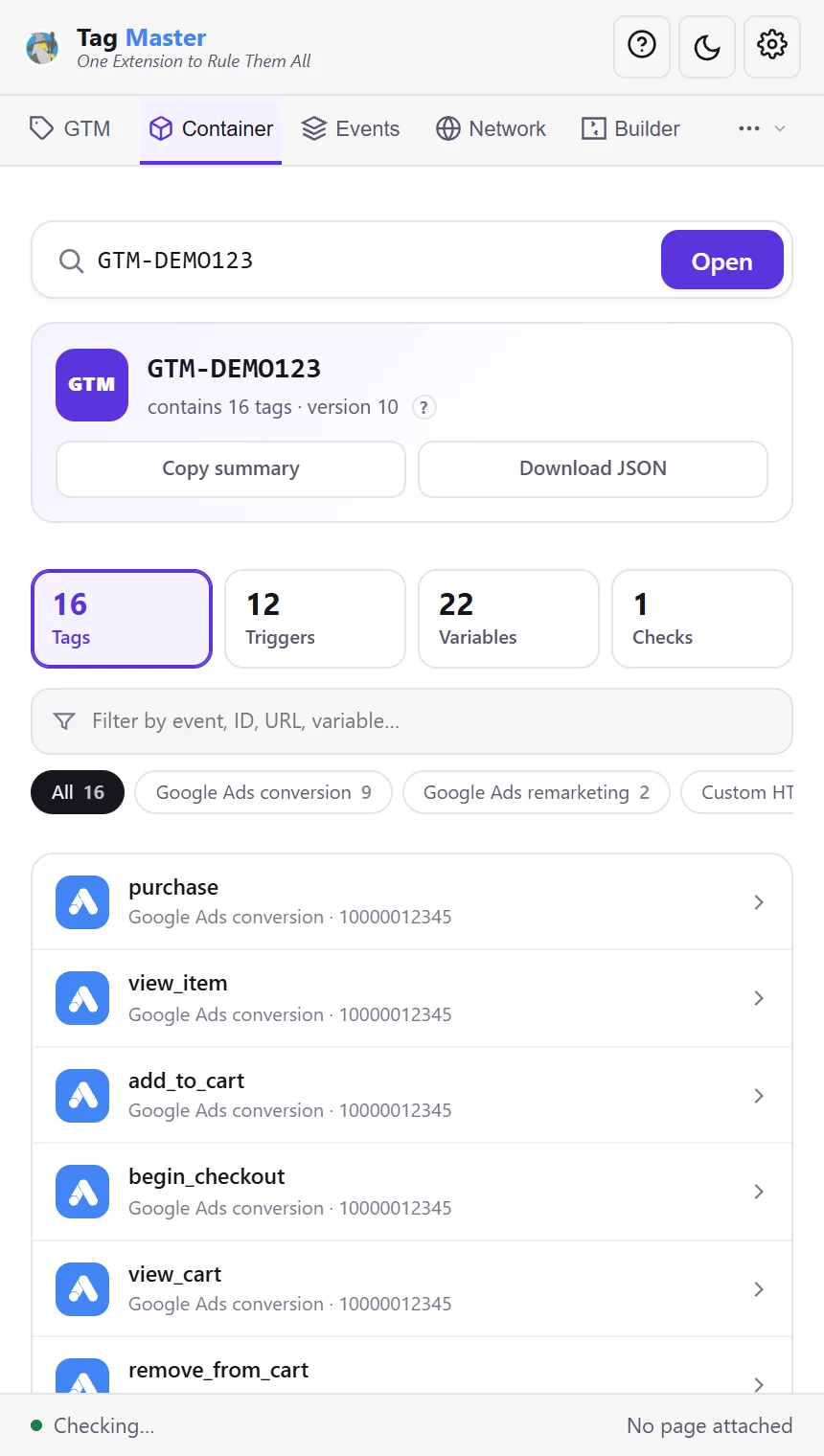
Read any GTM container by ID
Type an ID and every tag, trigger and variable opens, laid out like GTM — no account access needed. gtm.js is served to every visitor; the panel reads it as text and runs none of it.
- Consent settings, sequencing and zones
- This site’s container, one click away
- Checks for what is worth knowing
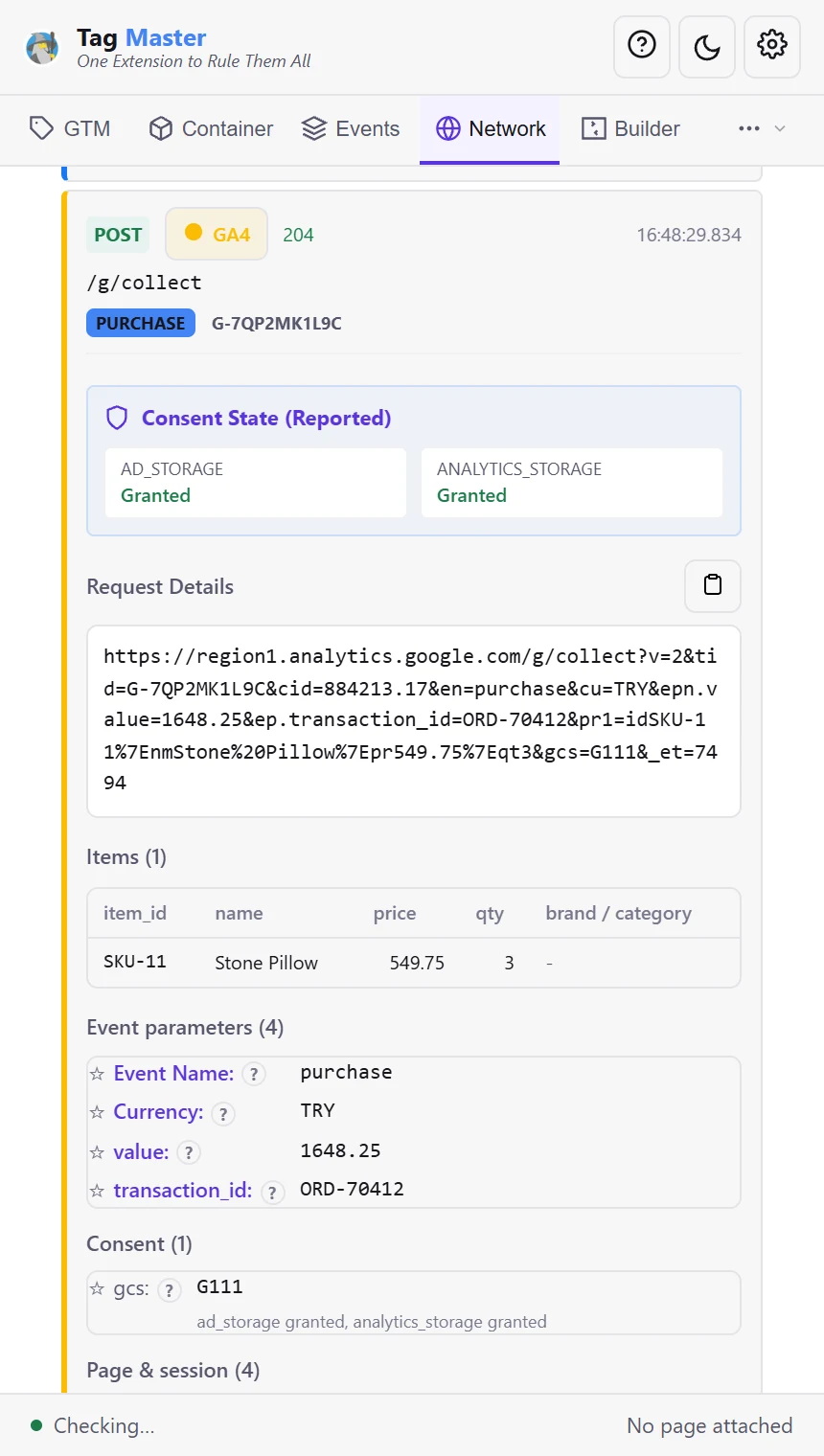
Every tracking hit, decoded
Named parameters instead of a query string, checked against the platform’s limits. Hits proxied through your own domain are recognised by their path, so server-side GTM is decoded too.
- 63 platforms, no configuration
- Hover any parameter for what it means
- Tied to the push that caused it
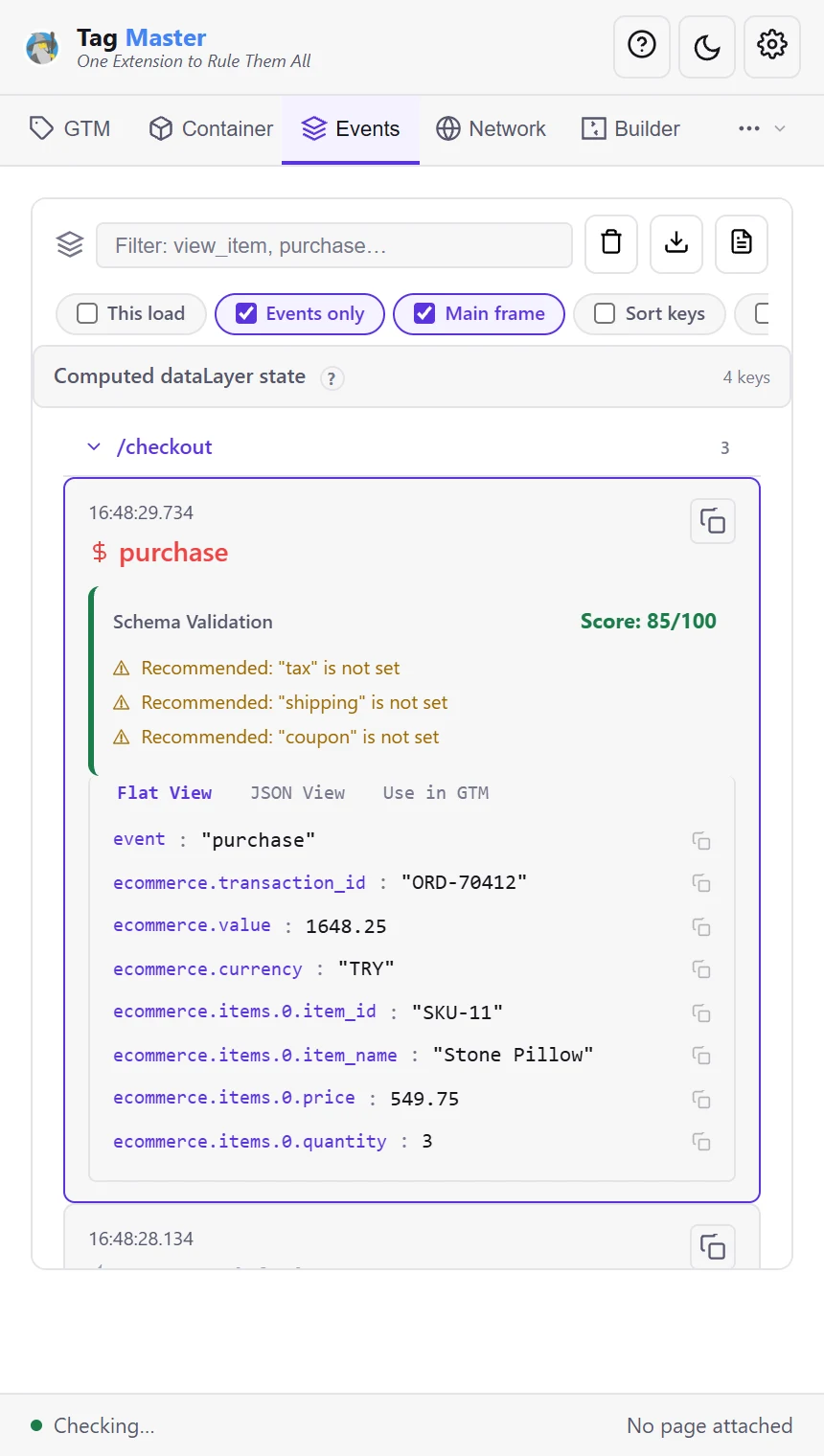
The dataLayer, push by push
Every push schema-checked and flattened into the paths a GTM variable reads — and shown beside the requests it actually produced.
- Schema checks on e-commerce events
- Copy any path as a GTM variable
- Filter by page, event or frame
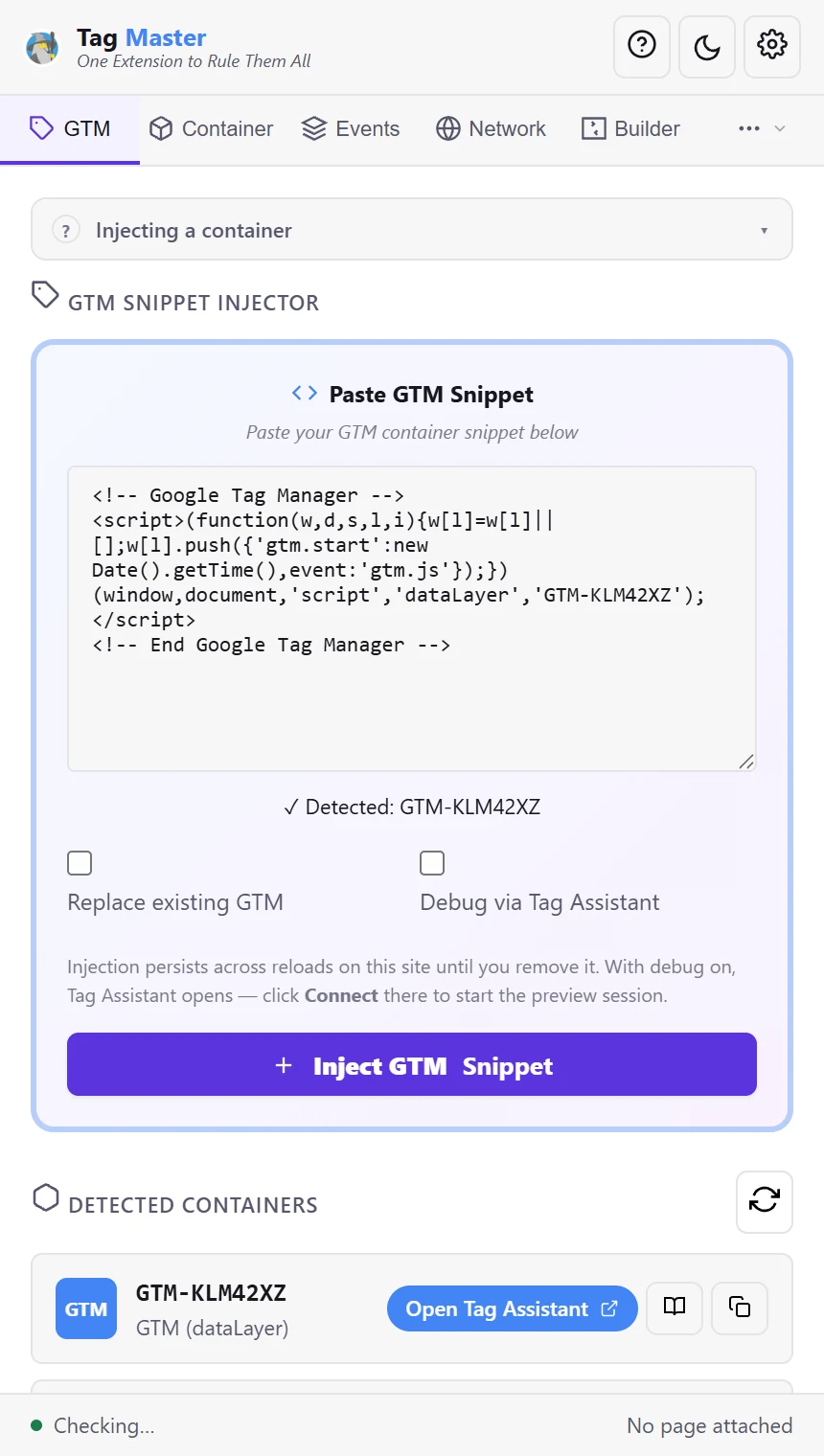
Inject a GTM container on any page
Paste the snippet and press Inject: the container runs as if the site had installed it, and comes back on every reload. Or put GTM’s Preview onto the tab you are already using.
- Test a container on a site that has none
- Replace the site’s own container
- Open Tag Assistant to debug it
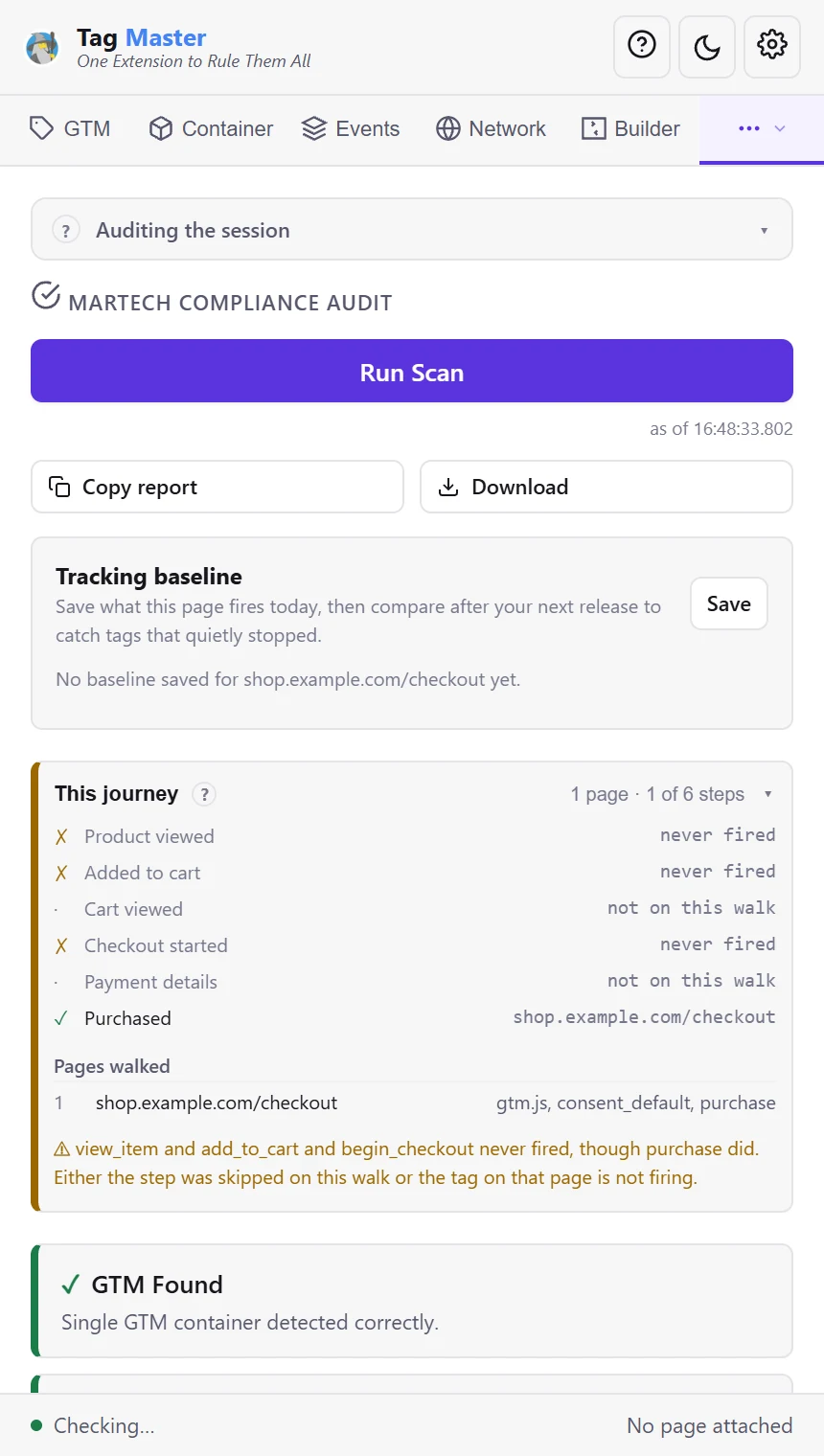
One pass over the whole journey
Which funnel steps fired and which never did, across every page you walked, as a report you can hand over.
- Funnel steps checked across pages
- Duplicate and missing conversions
- Copy or download the report
And more
The parts other debuggers leave out
Server-side GTM, seen
Hits sent through your own first-party endpoint are still recognised and decoded. Paste your preview token and they appear in your sGTM session, with a count of how many actually reached that host.
Consent Mode V2, as a sequence
All four signals live, gcs and gcd decoded per hit, and a list of every vendor that kept sending while ad consent was denied — the case Consent Mode itself does not cover.
GTM Preview on your own tab
No detour through tagassistant.google.com, which breaks on emulated devices and second checkout tabs. The preview rides on the container request, and the panel confirms it from what it captured.
Every platform’s test mode
TikTok, Snap, Microsoft UET, Tealium, Criteo, Yandex, Hotjar and Adobe Launch each have one — switch it on from the panel. Block any vendor’s hits while you test, and force GA4 DebugView.
Catch a push, get the GTM setup
Arm Pick Event, do the thing on the page, and the push becomes a trigger and variables. Finish as a GA4 event tag, a Google Ads conversion, or variables only — in GTM’s own import format.
Visual trigger builder
Click any element for a ready-to-paste GTM recipe: a stable selector that climbs to the clickable parent, condition options with copy buttons, and a variable that reads the price.
Compared
How it compares
Every tool here is free. The difference is coverage.
Swipe the table to see the other tools
| Capability | Tag Master | Tag Assistant | Omnibug | Meta Pixel Helper | Analytics Debugger |
|---|---|---|---|---|---|
| Platforms decoded | 63 | Google only | ~69 | Meta only | GA4, GTM, Adobe + |
| Server-side GTM hits recognised | ✓ | – | – | – | – |
| Explains why a GTM trigger fired | – | ✓ | – | – | – |
| Flags vendors firing without consent | ✓ | – | – | – | – |
| Element picker to GTM trigger | ✓ | – | – | – | – |
Local only
Your debugging stays in your browser
No account, no telemetry, no server of ours. The panel reads what the page sends and keeps it on your machine.
Read the privacy policy →- Off until you switch a site on. Sites you never turn on are never touched — no scripts, no capture.
- Captured sessions stay local. Stored in the browser, cleared from Settings or by uninstalling.
- Two requests, both on a button. Reading a container or a GA4 property fetches Google’s public file, carrying only the ID.
Guides
Field notes on tracking that breaks quietly
Practical walkthroughs for the problems this tool was built for.

How to debug GTM without Preview mode
Preview needs container access, changes the page, and only speaks for one container. Here is how to verify GTM from the requests it actually produces.
Read the guide →![Panel fragment labelled EVENT PICKED, showing event, items[0].item_id and kept.](/assets/images/thumbs/pick-a-datalayer-event.webp?v=0b78cd01-2)
One click, three pushes: picking the right dataLayer event
Adding to cart rarely fires one event. What a real storefront pushes, which of them a trigger should use, and the four kinds of push that are never the answer.
Read the guide →
The shop whose dataLayer is empty
You open the inspector on a working shop and nothing arrives. The events are real, they fired, and they are not in window.dataLayer. Four platforms route them somewhere no extension can read, and each has a different place to read them instead.
Read the guide →
The em on a GA4 hit is not Enhanced Conversions
Google now sends hashed customer data on the GA4 hit itself, under the same parameter name and the same envelope Google Ads has used for years. Two products, one spelling, and a failure mode that looks exactly like success.
Read the guide →
Debugging Consent Mode V2: gcs, gcd and the violations nobody catches
Read consent parameters straight from the hits, tell a default apart from an update, and find the vendors that fire regardless of what the banner says.
Read the guide →
Meta Pixel and CAPI: why purchases are counted twice
How deduplication actually works, what eid looks like in the browser request, and the five mistakes that turn a single order into two conversions.
Read the guide →FAQ
Questions
Is Tag Master free?
Yes — every feature, with no account, no login and no paid tier, including for commercial work. The extension collects no data; captured sessions stay in your browser.
How is it different from Google Tag Assistant?
Tag Assistant covers Google tags only and runs its debug session from an external site. Tag Master decodes 63 platforms in the side panel next to the page — including Meta, TikTok, LinkedIn, Adform, Criteo and Adobe Analytics — and adds server-side GTM detection plus Consent Mode V2 auditing. The two work well together: Tag Master can open Tag Assistant for you with the container prefilled.
Can I see inside a GTM container I have no access to?
Yes. Type any container ID and Tag Master reads the container’s gtm.js — the file every visitor of that site already downloads — and lists its tags with their settings, its triggers as conditions in plain words, and its variables. GTM does not publish the names given to tags, triggers and variables, so each is labelled by what it is. The only thing sent to Google is the ID.
Can it debug server-side GTM?
Yes. Hits are matched by request path rather than hostname, so GA4 requests proxied through your own first-party endpoint are still recognised and marked. You can also paste your X-Gtm-Server-Preview token so requests from your browser appear inside your server container preview session.
Does it collect any data?
No. There is no account, no telemetry and no server of ours. Everything is processed and stored locally. The extension only reaches Google when you press the button that asks it to — to read a GTM container or a GA4 property’s settings — and that request carries nothing but the public ID.
Will blocking hits break the site I am testing?
Blocking only affects tracking requests for the vendors you tick, and only while the toggle is on. The site’s own functionality is untouched, and blocked hits are still listed so you can see what would have been sent.
Stop guessing which tag fired
Install once, debug every platform. Free, including for commercial work.
Add to Chrome — it’s freeChrome 116+ · Manifest V3 · no account